Building an AI Productivity Stack That Keeps Agents Grounded
Building an AI Productivity Stack That Keeps Agents Grounded
Agentic AI isn’t about yet another chat tab, it’s about giving models the same surface area I use every day: the shell, markdown notes, and a predictable file system. After living inside WSL for years, the rising tide of local agents forced me to formalize a stack that lets Codex CLI, Claude code execution, or whatever model I’m testing plug straight into my laptop without babysitting. The throughline is simple: stay Linux-native, keep everything in plain text, and let agents operate as peers instead of hovering assistants.
Visual ideas
- Layered diagram of laptop hardware → Linux → terminals → agents, color-coded cyan/amber/violet.
- Split scene showing a user and two terminal-based agents collaborating on the same repo.
- Minimal timeline showing “Request → Agent plan → Shell action → Markdown update.”
Linux is the universal control plane
The fastest way to unlock general-purpose agents is to drop them into a real shell. Linux gives me first-class Docker, full process control, and predictable permission models, so I can isolate an overeager model before it rm -rfs my life. Hyprland on top of Arch added the missing polish: tiling tabs for Codex, Claude, and Gemini CLI sessions, GPU-accelerated compositing, and zero lag when an agent spawns a new workspace. Once I set it up (shout-out to resources like Omarchy’s Hyprland write-ups), spinning new environments is as trivial as cloning a repo and letting the agent run just or poetry commands.
I spent years balancing “business on Windows, fun on WSL,” but the syscall translation layer eventually blocked experiments—USB passthrough, GPU scheduling, even Docker networking routinely fought me. Pair that with Microsoft’s direction of travel and I was done babysitting. Native Linux means nothing lives behind emulation: USB devices, GPUs, and network namespaces stay accessible, whether I’m flashing a Jetson or benchmarking a local Qwen quantization. And if something breaks? Codex CLI or Claude code execution is already right there in a pane helping troubleshoot Arch, so the learning curve becomes part of the fun.
That said, giving an agent root on bare metal is asking for chaos. I containerize risky prompts, scope their volumes, and let Docker clean up afterwards so a curious LLM can’t nuke my dotfiles “because it felt like it.” Related experiments like [[AI's Impact on Linux Kernel Development]] reinforce why staying close to the hardware matters—you feel the changes as soon as they land upstream.
Visual ideas
- Stylized workstation map showing Hyprland windows for terminal, browser, and monitoring dashboard.
- Flowchart of “Agent prompt → search_tools → shell command → Docker container,” annotated with minimal text.
- Dark background photo-style render of a laptop with translucent overlays of CLI outputs.
Obsidian keeps the knowledge layer agent-friendly
Agentic AI drags us back to basics: models think best in plain text, which is why coding is still the gold standard. There’s a reason Microsoft is suddenly adding tables and AI helpers to Notepad after decades of neglect (Windows Central). Markdown is the lingua franca. Obsidian embraces that by keeping every project note, blog draft, or research log as simple files that sit in my vault, syncable through rsync, Syncthing, or whichever S3 bucket I feel like using. That means Codex CLI can open a file, make surgical edits, and leave context for Claude Desktop without fighting proprietary APIs.
I keep the structure intentionally boring: folders like Projects/ai-skoptimist with README-style landers, backlinks for discovery, and no heavyweight templates. Agents hook in through MCP bridges, so they fetch metadata only when necessary instead of hoarding the entire vault in their prompt. When I want privacy I yank a folder out of the shared workspace, keep a mirrored private vault offline, and keep rolling. The bonus is auditability—Obsidian’s graph view and git history show exactly which agent touched what.
Visual ideas
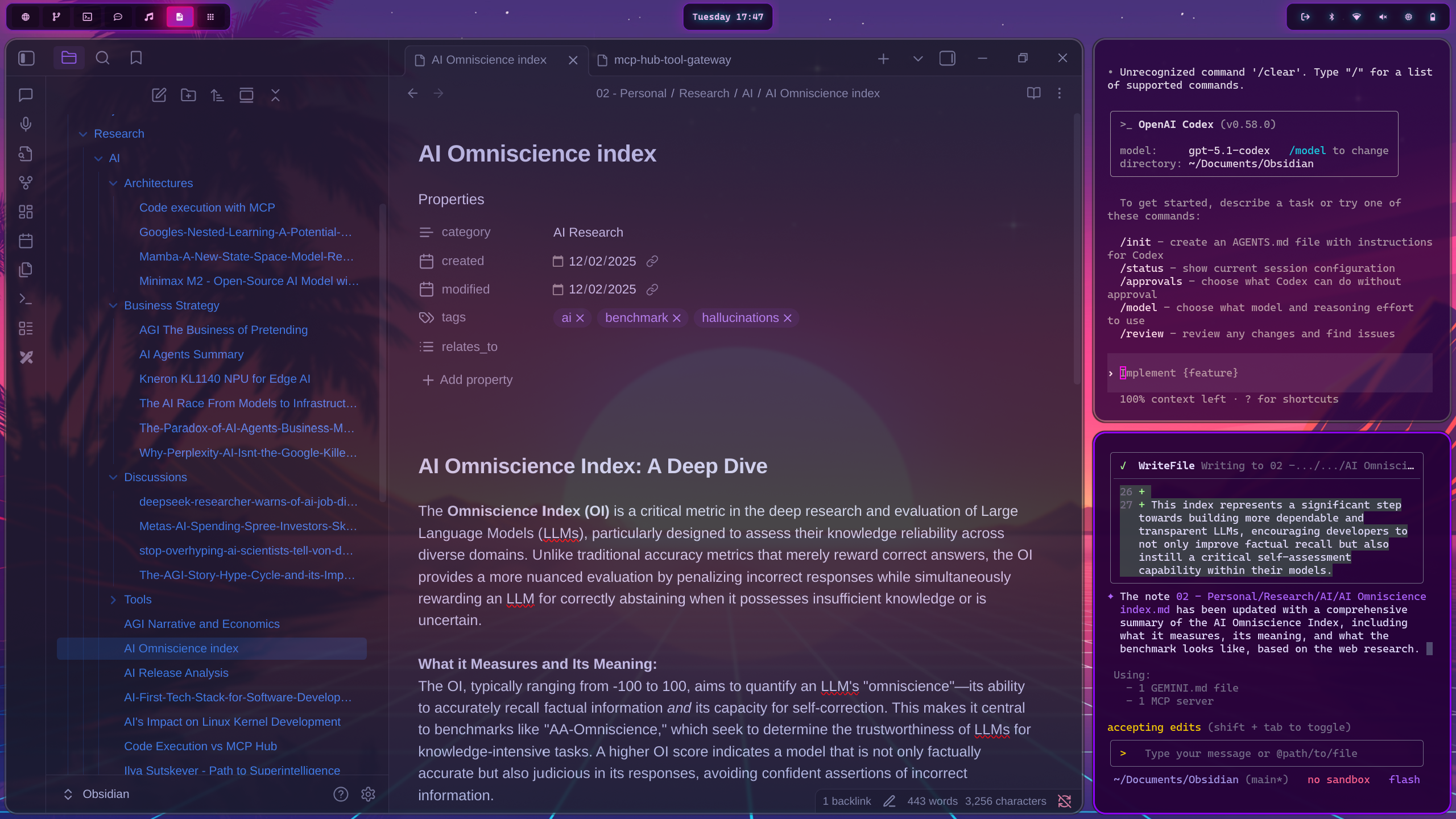
- Screenshot-style mock of an Obsidian note showing agent annotations in cyan and human notes in amber.
- Graph view reinterpretation with nodes labeled “Blogpost,” “Research,” “Agent Log,” connected via violet edges.
- Simple schematic of notes flowing from Obsidian into terminal agents and back.
Putting the stack to work
A typical session looks like this: Hyprland tiles two terminals plus Obsidian on the right. I launch Codex CLI in one pane to wrangle code, Claude’s new MCP-aware console in another to orchestrate tool usage, and a Gemini CLI tab for deep document search (the Google Gemini CLI remains my go-to for scraping PDFs). Agents discover tools through my MCP hub gateway post, grab only the schemas they need, and stream outputs into Markdown files under version control. I’m in the driver seat, but I can spin up as many assistants as I want by opening another terminal.
Because everything runs locally I can iterate relentlessly: snapshot a dockerized environment before a risky deploy, let an agent refactor a Terraform module, and capture the changelog straight into Daily/ notes. No copy/paste between SaaS tabs, just simple, unadulterated efficiency. Backups go to an encrypted restic repo so I’m never hostage to a cloud outage. The point isn’t to automate myself away—it’s to create a cockpit where each agent has the same context, IO primitives, and accountability I do.
References
- Hyprland details and community setup notes via Omarchy
- Hyprland project site for the compositor itself
- Obsidian for local-first markdown knowledge bases
- Google Gemini CLI for research-grade querying and scraping
- Docker for containerizing risky agent runs